Research in engineering and design often involves applying a procedure to a range of cases. We might compare design alternatives, analyse a collection of datasets, process experimental measurements, or run a simulation with different parameter values. The calculations themselves are only part of the task: we also need to decide which operations to perform for each case, what to repeat, and when to stop.
These decisions often depend on the data or on intermediate results. A data-analysis routine may skip an entry with missing information. A simulation may repeat a calculation until a convergence criterion is met. A design study may retain only candidates that satisfy specified constraints. A program needs explicit instructions for each of these situations, including what to do when an operation cannot be completed.
In the previous chapter, we represented data and performed operations on them. We now consider how to organize those operations into a procedure. The order in which a program executes its instructions is called control flow. Python normally works through statements in sequence. Conditional statements select a block of instructions according to a condition, while loops repeat a block across a collection of items or while a condition holds.
This chapter introduces these structures, then considers how to skip an item, end a loop early, and respond to an error. A short worked example combines them by checking a set of values against stated limits and handling missing entries.
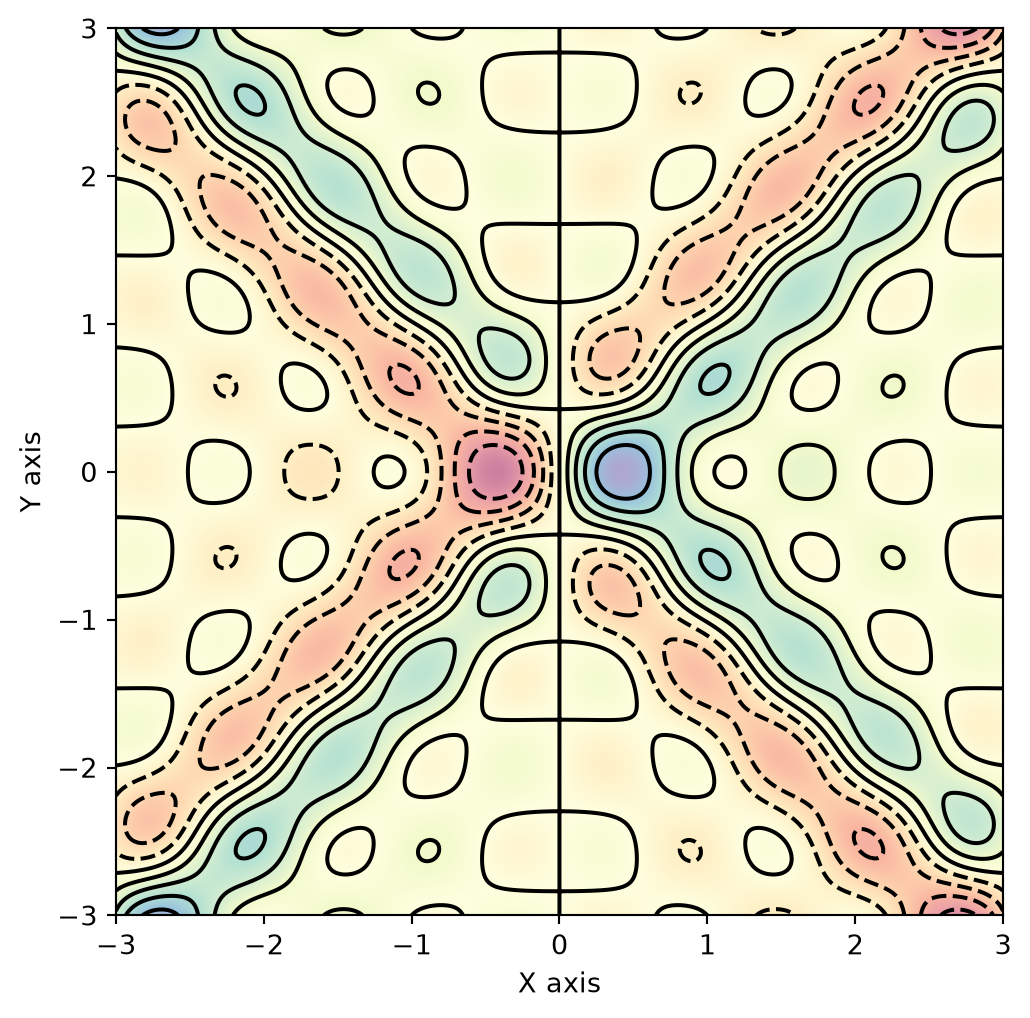
The pattern below is an illustration of repetition: each pass through a loop adds another contribution to the same array. The plotting code is optional; the examples that follow introduce the control structures separately.
Show illustration code (optional)
import numpy as npimport matplotlib.pyplot as plt# Define grid sizex = np.linspace(-3.0, 3.0, 400)y = np.linspace(-3.0, 3.0, 400)X, Y = np.meshgrid(x, y)# Define a function to create loop patternsdef generate_loop_pattern(X, Y, num_loops): Z = np.zeros_like(X)for i inrange(1, num_loops +1): Z += np.sin(X * i) * np.cos(Y * i)return Z# Generate loop patternsnum_loops =5Z = generate_loop_pattern(X, Y, num_loops)# Create plotplt.figure(figsize=(8, 6))# Superimpose imshow and contourplt.imshow(Z, extent=(-3, 3, -3, 3), origin='lower', cmap='Spectral', alpha=0.5)contour = plt.contour(X, Y, Z, levels=10, colors='black')# Label the axesplt.xlabel('X axis')plt.ylabel('Y axis')plt.show()
Figure 3.1: A pattern formed by repeatedly adding five contributions
3.1 Conditionals
An if statement tests a condition before executing an indented block. A comparison such as a > b produces a Boolean value. Python can also test other objects for their truth value, as discussed in Chapter 2; a condition does not have to be an object of type bool.
Start with two values and inspect their comparison:
a =0b =1100
a > b
False
if a > b:print("a is greater than b")print(a**2)else:print("a is less than or equal to b")print(b**2)
a is less than or equal to b
1210000
The if block runs when a > b is true; otherwise the else block runs. Here the comparison is false, so the second block is selected. Equality also belongs to that second branch.
Syntax: end each if, elif, and else header with a colon. Indent the statements belonging to that block by four spaces. Statements at the same indentation level belong to the same block.
3.1.1 Additional Conditions
Use elif to test another condition when the preceding condition is false. In one if–elif–else chain, Python executes only the first matching branch. The final else handles all remaining cases:
if a > b:print("a is greater than b")elif a == b:print("a and b are equal")else:print("a is less than b")
a is less than b
3.1.2 Short Conditional Forms
A short if statement can fit on one line, although an indented block is easier to extend:
if a <1: print("a is less than one")
a is less than one
To choose between two values, use a conditional expression: value_if_true if condition else value_if_false. The expression below selects the message before it is printed:
message ="a is less than one"if a <1else"a is at least one"print(message)
a is less than one
3.1.3 Combining Conditions
Use and when both conditions must be true, and or when at least one must be true. These operators short-circuit: Python evaluates the second operand only if the first has not already determined the result. With and, a false first operand is enough; with or, a true first operand is enough.
if b > a and a ==0:print("b is greater than a, and a is zero")
b is greater than a, and a is zero
if b > a or a ==0:print("At least one condition holds: b > a or a == 0")
At least one condition holds: b > a or a == 0
This behaviour can prevent an unnecessary or invalid operation. When the denominator is zero, the second part of this and expression is not evaluated, so the division is skipped:
denominator =0if denominator !=0and10/ denominator >2:print("The quotient is greater than two")else:print("The denominator is zero or the quotient is at most two")
The denominator is zero or the quotient is at most two
3.1.4 Nested Conditions
A conditional block can contain another conditional. Here the inner test is reached only when x > 10. Its else belongs to the inner if, as shown by the indentation:
x =50if x >10:print("Above ten")if x >20:print("Also above twenty")print(x**2)else:print("At most twenty")
Above ten
Also above twenty
2500
3.2 Loops
A loop applies the same block of instructions repeatedly. Use while when repetition depends on a condition, and for when working through the items of an iterable, such as a list.
3.2.1 While Loops
A while loop tests its condition before every iteration. If the condition is false at the first test, the block does not run. The loop below prints 1 through 5; incrementing k eventually makes the condition false:
while condition:# Statements to repeat while the condition is true.
Make sure the loop can reach a stopping condition. If the values involved never change, a true condition can keep it running indefinitely.
k =1while k <6:print(k) k = k +1
1
2
3
4
5
After the loop, k is 6. The body did not run for that value because k < 6 was false.
3.2.1.1 Ending a Loop with break
break immediately exits the innermost loop. In the next example, it ends the loop before the condition k < 10 becomes false:
k =1while k <10:if k >3:breakprint(f"The value of k is: {k}") k = k +1
The value of k is: 1
The value of k is: 2
The value of k is: 3
This prints 1, 2, and 3, then exits with k equal to 4. Without break, it would print through 9 and end with k equal to 10.
3.2.1.2 Skipping an Iteration with continue
continue skips the rest of the current iteration. In a while loop, execution returns to the condition test. In this example, the counter must be incremented before continue; otherwise it would remain at 5 and the loop would never finish:
The output contains 1 through 10 except 5. Here count += 1 is shorthand for count = count + 1.
3.2.2 For Loops
An iterable is an object whose items can be visited one at a time. Lists, tuples, strings, dictionaries, and sets are examples. A for loop assigns each item to a name and executes the block for that item:
for item in iterable:# Statements to run for this item.
The loop finishes when there are no more items, unless it exits earlier. For a list or tuple, items are visited in their stored order; a set does not provide a defined positional order.
my_list_of_data = [1, 'test', 3, 4]
for my_item in my_list_of_data:print(my_item)
1
test
3
4
continue also works in a for loop. Here we omit specimen codes that start with M and collect the remaining codes in a new list. startswith() tests the beginning of a string:
specimens = ["M50", "XM20", "YM50", "M20", "M56"]
cleaned_specimens = []
for specimen in specimens:if specimen.startswith("M"):continue cleaned_specimens.append(specimen)
Inspect the collected codes:
cleaned_specimens
['XM20', 'YM50']
With break, the entire loop ends. This example prints M50, stops when it reaches M30, and never visits the later entries:
specimen_code ="M50"for character in specimen_code:print(character)
M
5
0
Iterating over a dictionary directly visits its keys. Use .items() to obtain key–value pairs, or .values() to visit only the values:
material = {'name': 'Iron',
            'Symbol': 'Fe',
            'Atomic radius (pm)': 126}
for key, value in material.items():print(key, ":", value)
name : Iron
Symbol : Fe
Atomic radius (pm) : 126
3.2.4 Integer Sequences with range
range() creates an immutable sequence of integers. It is iterable, but it is neither a list nor an iterator. It stores the bounds and step rather than constructing a list of every value.
range(n) gives integers from 0 up to, but excluding, n. Here range(6) supplies the six values 0 through 5. You can inspect help(range) for the full reference.
# Evaluate the same expression at six integer values.for x inrange(6): y = x + x**2+ x**0.3print(x, y)
Use range(start, stop, step) to choose the starting value and increment. The stop value is excluded and the step must be a nonzero integer. The next example collects 11 pairs, for inputs 0, 10, 20, …, 100:
my_data = []for z inrange(0, 101, 10): y = z + z**2+ z**0.3 my_data.append((z, y))
zip() supplies corresponding items from two or more iterables. By default it stops when the shortest input is exhausted, so extra items in a longer input are not visited:
for first, second inzip(first_values, second_values):print(first, second)
1 3
4 12
16 48
32 96
3.3 Generator Expressions
A generator expression describes how to produce values one at a time, instead of first building a list of all results. The expression below creates a generator for the squares of 1 through 5. Each square is calculated when requested:
squares = (x**2for x inrange(1, 6))
type(squares)
generator
for square in squares:print(square)
1
4
9
16
25
The loop has now consumed this generator. A generator keeps its position and does not restart automatically. Create it again to start over, then use next() to request one value at a time:
squares = (x**2for x inrange(1, 6))print(next(squares)) # First value: 1.
1
print(next(squares)) # Second value: 4.
4
A loop over this same generator continues from its current position, producing only the remaining values:
for square in squares:print(square) # 9, 16, and 25.
9
16
25
3.4 Iterators
An iterator supplies successive items through next() and remembers its position. An iterable can provide an iterator through iter(). A list can provide a fresh iterator each time you start a loop; a generator is itself an iterator and is consumed as you advance it.
An iterator over a list does not copy the list, but the original list still occupies memory. A generator can instead calculate results as they are requested; memory use depends on the objects involved.
Create an iterator over a short list:
my_list = [1, 2, 3]my_iter =iter(my_list)
type(my_iter)
list_iterator
print(next(my_iter))
1
for item in my_iter:print(item)
2
3
next(my_iter) consumed the first item, 1. The loop then printed the remaining items, 2 and 3. Calling next() after an iterator is exhausted raises StopIteration. A for loop handles that signal by ending normally.
A for loop obtains an iterator from its input and repeatedly requests its next item. This is why the same loop syntax works with lists, strings, generators, and other iterables.
3.5 Itertools
The standard-library module itertools provides tools for combining or repeating iterable inputs. The following examples introduce five of them.
count(start, step) produces an unbounded progression. We use break to stop after the value 10:
import itertools# Generate a sequence of numbers starting from 0 and incrementing by 2for i in itertools.count(0, 2):if i >10:breakprint(i)
0
2
4
6
8
10
cycle(iterable) repeats the input’s elements. It saves the elements from the first pass so it can reuse them. Here a counter limits the output to ten values:
my_list = [1, 2, 3, 4]counter =0for i in itertools.cycle(my_list): counter +=1if counter >10:breakprint(i)
1
2
3
4
1
2
3
4
1
2
repeat(value, times) produces the same value a specified number of times. Omitting times makes it repeat indefinitely:
for i in itertools.repeat(5, 5):print(i)
5
5
5
5
5
chain(*iterables) visits all items from the first iterable, then the second, and so on:
list1 = [1, 2, 3]list2 = [4, 5, 6]list3 = [7, 8, 9]for i in itertools.chain(list1, list2, list3):print(i)
1
2
3
4
5
6
7
8
9
product(*iterables) produces every combination of items from its inputs. With two inputs, it gives all pairs, as nested loops would. Its optional repeat argument repeats the collection of inputs. It stores the input pools before generating combinations, so the inputs must be finite:
Some operations cannot finish with the values they receive. Converting nonnumeric text to a number raises ValueError, for example, while division by zero raises ZeroDivisionError. An exception interrupts the normal sequence of statements.
Use try and except when you expect a particular failure and can specify what should happen in response:
try:# Operations that may raise an exception.except SomeError:# Response to this kind of exception.else:# Runs if the try block finishes without an exception.finally:# Runs when leaving this statement, including after an exception.
The else and finally blocks are optional. finally is often used for cleanup. An exception without a matching handler propagates to the surrounding code; handling an expected error does not mean silently ignoring every error.
The next example converts two pieces of text to numbers before dividing them. These are fixed inputs so the notebook can run without prompting:
numerator_text ="25"denominator_text ="0"try: numerator =float(numerator_text) denominator =float(denominator_text) result = numerator / denominatorexceptValueError:print("Error: both inputs must be numeric text")exceptZeroDivisionError:print("Error: the denominator must not be zero")else:print(f"Result of division: {result}")finally:print("Division attempt finished")
Error: the denominator must not be zero
Division attempt finished
With the given inputs, conversion succeeds but division by zero selects the second handler. The final message is printed afterwards. Try changing denominator_text to "5" to see the successful path, or to "missing" to see the conversion handler. The calculation happens in try; else displays its result only when try finishes successfully.
3.7 Worked Example: Checking Specimen Diameters
Suppose six specimens have been measured and each diameter should lie between 9.8 mm and 10.2 mm, including both limits. These limits are chosen for this exercise. One specimen has no recorded measurement, represented by None.
Our task is to collect the specimen codes into three lists: accepted, rejected, and missing. The complete input is small enough to inspect directly:
For each specimen, first check whether the measurement is missing. diameter is None tests for that value; it is different from testing whether a number is zero. Record missing measurements and use continue to skip the numerical comparison.
For the remaining measurements, lower_limit <= diameter <= upper_limit includes both boundaries. An if–else block decides which list receives the specimen code:
Specimens S1, S4, and S6 are accepted; S2 and S5 are rejected; S3 is missing. The boundary measurements in S4 and S6 are accepted because the comparisons use <=.
The for loop visits every record, continue avoids comparing None with a number, and if–else selects a result list. Missing data remain separate from measurements that failed the tolerance check.
3.8 Exercises
3.8.1 Theory
Explain the difference between a for loop and a while loop. When would you choose each?
What do break and continue do? Which loop is affected when loops are nested?
Explain nested control flow using a short example.
What is the difference between if on its own and if–else? How many branches of a single if–elif–else chain can run?
Explain short-circuit evaluation. Why does the denominator check earlier in the chapter avoid division by zero?
3.8.2 Coding
Given a list of integers, use a loop to calculate the sum of the even values. Recall that value % 2 == 0 tests whether an integer is even.
Given a nonempty list of integers, use a loop to find its maximum value and the index of its first occurrence. Consider starting with the first item as the current maximum and using enumerate() to track positions.
Ask the user for an integer and use a for loop to print its first ten multiples, starting with one times that integer.
Remove duplicate values from a list while preserving the order of their first occurrence. Build a new list; value not in new_list tests whether the value has not yet been collected.
Generate the prime numbers from 2 through 1000. For each candidate, test integer divisors starting at 2, and stop testing once a divisor is found. Use a Boolean flag and append() to collect the primes.
Generate the first 15 Fibonacci numbers, starting with 0 and 1. Each subsequent value is the sum of the previous two: \(f_n = f_{n-1} + f_{n-2}\).